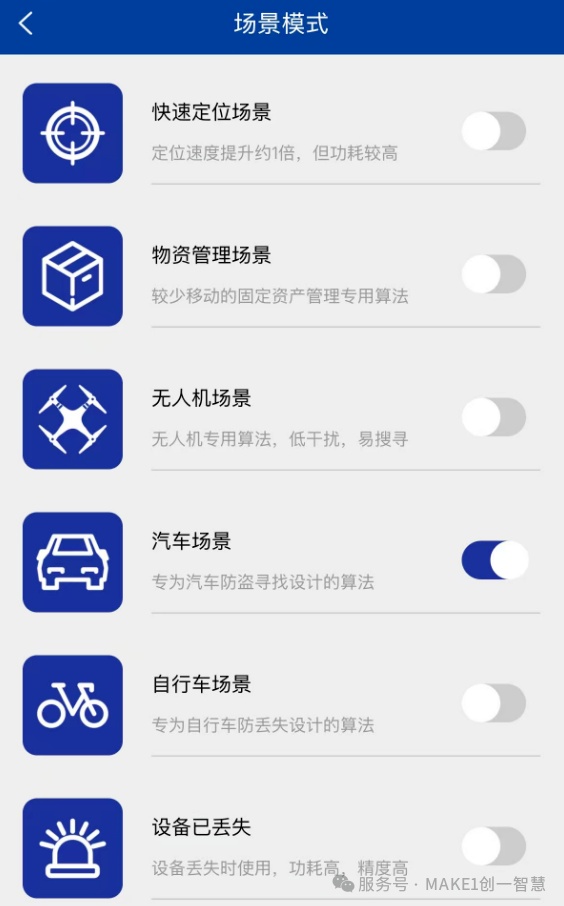

1. What is a Scene Mode?
Different usage scenarios have significantly different requirements for positioning algorithms. For example, cars are typically outdoors and move quickly over long periods, bicycles may spend part of their time indoors and move slowly, while goods are mostly stationary indoors.
Therefore, MAKE1 specially optimizes algorithms for different use cases to better match the specific characteristics of each scenario, achieving an optimal balance between low power consumption and high performance.
After selecting a specific scene mode, the device will operate using the dedicated algorithm for that scene. When the scene mode is not enabled, the device uses the standard positioning algorithm.
Different device models may support different scene modes, as each model is designed to suit varying types of scenarios.
2. How to Enable Scene Mode?
Device Details Page → Device Settings → Advanced Features → Scene Mode
3. What is the Relationship Between Scene Mode and Mlasting Mode?
Scene Mode and Mlasting Mode are two independent settings. Scene Mode allows you to select your current use case, while Mlasting Mode adjusts the device’s transmission speed.
Each Scene Mode includes four Mlasting Mode options: 300, 200, ECO, and SOS. When both Scene Mode and Mlasting Mode are selected, you are actually choosing the built-in Mlasting Mode associated with the selected Scene Mode, rather than the default general Mlasting Mode.
4. Is It Necessary to Choose a Scene Mode?
It is not mandatory to enable Scene Mode—general mode can adapt to most application scenarios. However, Scene Mode delivers better performance in its intended context.
For example, if your device is lost and cannot be found, enabling "Lost Device" mode increases the chances of recovery. If the device is installed on a vehicle, it is recommended to enable "Vehicle Scene" mode, which better matches the positioning sensitivity needs for fast-moving vehicles.
5. Why Can't I See Scene Mode on My Device?
Scene Mode availability varies across device series. Some models do not support Scene Mode.